Medical Digital Signage: Patient Wayfinding, Queue Updates and Healthcare Communication

Martin Uhr
An expert in digital signage, Martin consults with nationally recognised brands to help develop, plan and deliver large-scale digital signage projects.
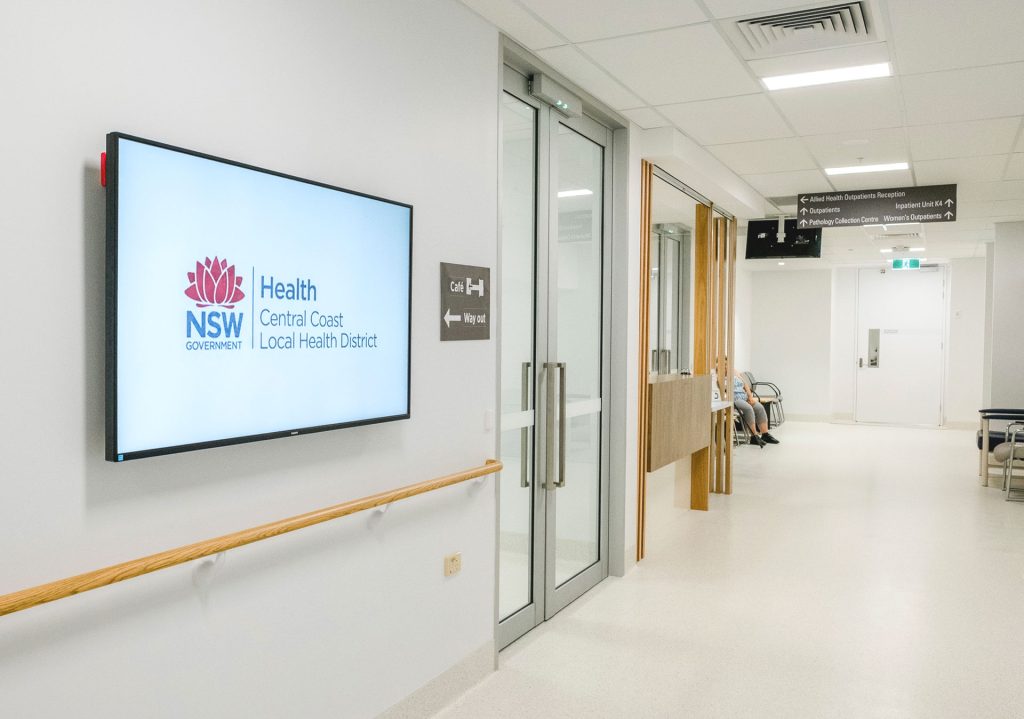
A hospital visit often begins with uncertainty. A patient may be looking for imaging, a parent may be trying to find a clinic, and a visitor may not know which entrance is open after hours. Medical digital signage can reduce that confusion by placing clear, current instructions at the points where people make decisions. It can guide movement, reinforce queue updates and share approved information without requiring staff to answer the same basic questions repeatedly.
The practical goal is not to add screens everywhere. It is to identify where communication breaks down. A useful healthcare digital signage plan starts with the patient journey, then assigns each display or kiosk a specific role.
How Does Digital Signage Improve Patient Wayfinding?
Complex facilities create avoidable stress when directions rely on static signs alone. Buildings change, clinics relocate and visitors enter through different doors. Patient wayfinding should help people understand the next step from the moment they arrive. That may mean a welcome screen near the entrance, a directional display at a corridor junction or an interactive kiosk in the main lobby.
The strongest approach follows the real journey. Start at the car park, public-transport stop or drop-off point. Walk toward reception, lifts and high-traffic intersections. Note where people slow down, turn around or ask for assistance. Those moments reveal where medical digital signage can provide the most value.
Directions should also be written for people under pressure. Use familiar department names, readable text and clear arrows. Avoid overcrowding a screen with every possible destination. When a facility needs deeper navigation, an interactive kiosk can give visitors a searchable route while simpler displays reinforce the path.

How Can Clinics Reduce Queue Confusion?
Waiting becomes more frustrating when people do not know what is happening. Clinics cannot always eliminate delays, but they can explain the process more clearly. Queue management solutions can show where a patient should check in, whether a service is running behind schedule and what step comes next.
This matters because the waiting room is not the only queue. People may pause at registration, pathology, pharmacy or specialist reception. A healthcare digital signage setup should distinguish between operational messages and general information. A queue update needs immediate visibility. A wellbeing reminder can wait.
Keep messages calm and specific. Tell patients whether they should remain seated, move to another area or speak with reception. Do not display private information that could identify an individual. The screen should reduce uncertainty without creating a privacy problem.
Where Should Healthcare Screens Be Placed?
Screen placement should follow decisions, not empty wall space. A display is useful when it answers a question at the moment the question arises. At an entrance, that may be where to check in. At a lift lobby, it may be which floor serves a particular clinic. Near a waiting area, it may be whether patients should watch a screen or listen for staff instructions.
The Wayfinding system works best when the signs form a connected sequence. Each message should prepare the visitor for the next decision point. If one screen sends people toward a corridor but the next junction has no follow-up direction, the system has failed at the exact moment support is needed.
Use medical digital signage selectively. Prioritise entrances, major intersections, reception areas and locations where visitors commonly become uncertain. Then test the route with someone who does not know the building.
What Should Hospitals Show on Digital Signage?
Healthcare communication has a stricter standard than ordinary promotional content. Messages may need approval, scheduled expiry dates and clear ownership. Healthcare digital signage should support those controls rather than depend on last-minute edits by whichever staff member is available.
Create approved templates for common needs: temporary entrance changes, service disruptions, clinic directions, infection-control reminders and emergency instructions. Define which messages can be scheduled routinely and which require escalation. Restrict publishing permissions for urgent content. Review every slide for readability, relevance and privacy before it goes live.
The limitation is simple: screens cannot replace clinical instructions, direct staff communication or emergency procedures. They support those systems. Well-governed queue management solutions and signage networks reinforce the message without pretending one channel can solve every communication problem.
How Can Healthcare Teams Keep Screen Content Useful?
A healthcare digital signage content plan should remain simple enough to manage. Prioritise short instructions, strong visual hierarchy and a limited number of slides. If a message takes too long to read, move the detail to a kiosk, a printed handout or a staff conversation.
Review the network regularly. Check whether directions still match the building, whether expired notices remain visible and whether frontline teams are still answering the same questions. For queue management solutions, review whether updates are timely and whether patients understand what action to take.
A simple content audit can use three questions. Is the message necessary at this location? Can a visitor understand it within a few seconds? Does the message direct the reader toward a clear next action? If the answer is no, shorten it, move it or remove it. Frontline staff should take part in this review because they hear the questions that signage does not answer. Their feedback can reveal gaps that a design review misses, especially during busy periods, temporary relocations and service changes.
A useful review meeting does not need to be long. Ask what changed in the facility, where confusion still occurs and which screens are carrying information that no longer earns its place. This is how signage network stays practical after installation.
Frequently Asked Questions
What Is Medical Digital Signage?
Medical digital signage is a network of screens or kiosks used to share approved information in hospitals, clinics and related facilities. It can support directions, waiting-area communication, service notices and safety reminders. The content should be clear, current and appropriate for the location.
How Does Patient Wayfinding Work?
Patient wayfinding uses signs, displays or interactive kiosks to help people move through a facility. A good system provides guidance at each major decision point, from the entrance to the clinic or service area, instead of relying on one large directory in the lobby.
Can Digital Signage Reduce Clinic Wait-Time Confusion?
Digital screens cannot shorten every delay, but they can reduce uncertainty. Clear instructions and queue management solutions can tell patients where to check in, what step comes next and whether they should remain in the waiting area or speak with reception.
Plan a Clearer Healthcare Communication Journey
Clear communication makes a healthcare environment easier to navigate. Engagis can help organisations plan displays, kiosks and content workflows around real patient and visitor needs. Whether the priority is safer movement, clearer clinic updates or a more manageable signage network, begin with the journey. Speak with the Engagis team about a practical rollout for your facility.
You Might Be Interested In
Digital Signage Solutions: A Complete Guide
Cloud-Based Digital Signage: Security, Uptime and Governance for Enterprise Networks

LED vs LCD Advertising Screens Compared
Your Digital Signage & AV Starts Here
Get expert guidance, reliable delivery, and ongoing support - end to end. Talk to our team about solutions tailored to your organisation.