Digital Kiosks Explained: Types & Use Cases

Martin Uhr
An expert in digital signage, Martin consults with nationally recognised brands to help develop, plan and deliver large-scale digital signage projects.
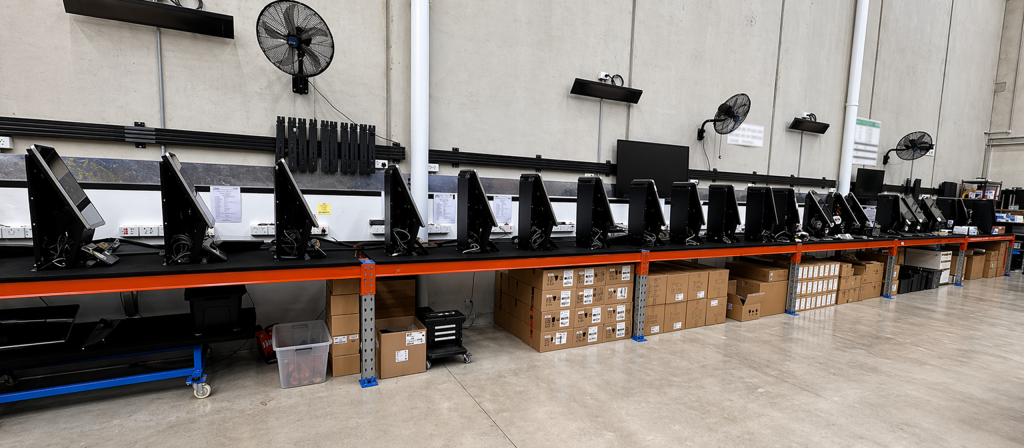
A digital signage kiosk is a standalone, screen-based device that lets a customer complete a task themselves, such as checking in, browsing a catalogue, or placing an order, without needing a staff member. Engagis designs, supplies and installs digital kiosks for retail, healthcare, banking and corporate environments across Australia. This guide covers the main kiosk types, where each one is used, and how to choose the right format for a specific location.
What Is a Digital Kiosk?
A digital kiosk is a self-contained hardware unit built around a touchscreen, designed to let a person complete a specific task on their own. It differs from a standard touchscreen kiosk display used purely for information, since most digital kiosks are built to complete a transaction or process, not just display content.
The category covers everything from a simple wayfinding directory in a shopping centre to a full self-service ordering kiosk in a quick service restaurant. What ties them together is the self-service model. A person interacts directly with the screen and completes their task without waiting for staff assistance.
What Are the Main Types of Digital Kiosks?
Digital kiosks generally fall into three physical categories: free-standing, wall-mounted, and desk-mounted, chosen based on available space, foot traffic and how the kiosk will be used.
Free-Standing Kiosks
Free-standing kiosks are fully enclosed units that sit on the floor, commonly seen in shopping centres, hospital foyers and bank branches. They suit high-traffic areas where the kiosk needs to be a clear, standalone destination rather than attached to a wall or counter.
Wall-Mounted Kiosks
Wall-mounted touch screens save floor space and suit narrower areas such as corridors, entryways or queue lines. They are common for wayfinding directories and simple check-in points where a full enclosure is not needed.
Desk Mounted Kiosks
Desk-mounted kiosks sit on a counter or reception desk, often in a fixed or adjustable stand. They suit environments such as reception check-in, visitor registration or an assisted selling setup where a staff member and customer may use the screen together.
What Are Common Digital Kiosk Use Cases?
Digital kiosks are most commonly used for wayfinding, self-service ordering, check-in and queue management, visitor registration, and product configuration. Each use case is built around removing a specific bottleneck, usually a queue, a wait, or a staff member repeating the same task.
- Wayfinding. Interactive maps that help visitors find a department, room or store in a large building.
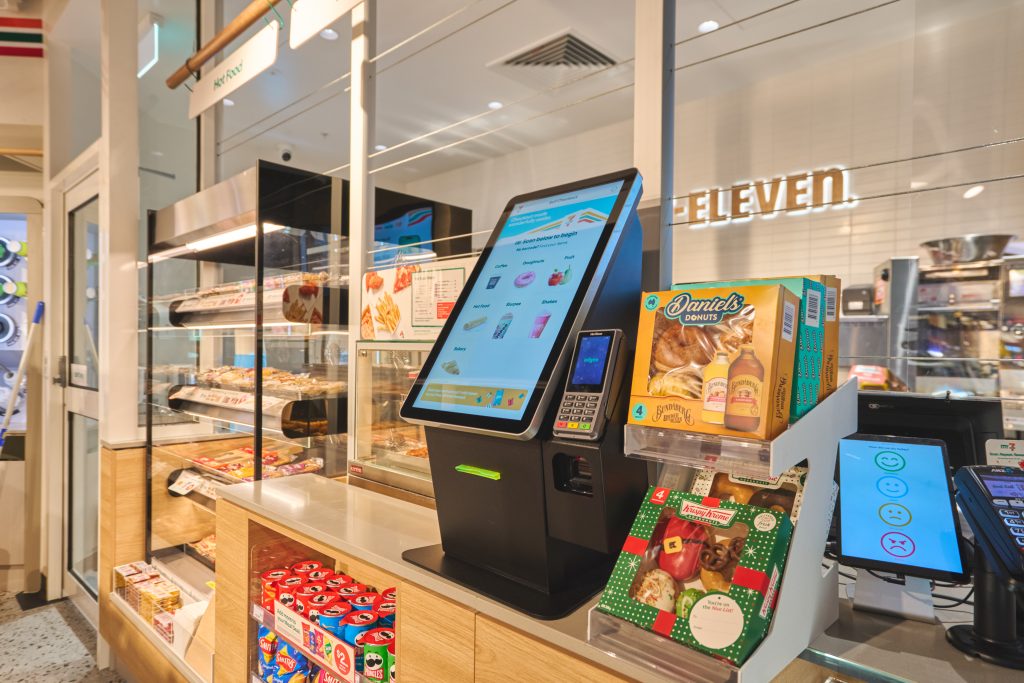
- Self-service order and payment. Common in quick service restaurants and retail, letting customers order and pay without a staff member.
- Visitor and queue management. Check-in kiosks that register a visitor or contractor, or issue a queue number.
- Product extenders and configurators. Kiosks that let a customer browse an extended catalogue or configure a product beyond what fits on a shelf.
- Exit surveys. Short, screen-based feedback captured at the point a customer leaves a location.
What Industries Use Digital Kiosks the Most?
Retail, healthcare, banking and corporate environments are the heaviest users of digital kiosks, each applying the technology to a different bottleneck in how customers or staff move through a space.
In retail, kiosks reduce queues at peak times and let customers browse a wider range than physical shelf space allows. In healthcare, kiosks handle patient check-in and wayfinding across large hospital campuses, reducing pressure on reception staff. In banking, kiosks support a shift away from routine transactions at the counter toward advice-based conversations. In corporate settings, kiosks are used for visitor registration and contractor sign in, particularly where security and compliance records matter.
How Do You Choose the Right Digital Kiosk for a Location?
Choosing the right digital kiosk comes down to available space, expected foot traffic, and whether the kiosk needs to sit indoors or withstand outdoor conditions. These three factors narrow the choice between free-standing, wall-mounted, and desk-mounted formats quickly.
- Available space. A free-standing enclosure needs floor space a wall-mounted screen does not.
- Foot traffic. High traffic locations usually justify a free-standing unit built as a clear destination point.
- Indoor or outdoor. Outdoor kiosks need weatherproofing and higher brightness, which changes both hardware and cost.
- Task complexity. A simple wayfinding directory needs less processing power and integration than a self-service ordering kiosk connected to a payment system.
A kiosk supplier who manufactures locally, rather than reselling an imported off-the-shelf unit, can usually adjust enclosure size, orientation and mounting to fit a specific site rather than asking the site to fit the hardware.
Integration needs are worth mapping out before hardware is chosen, not after. A wayfinding kiosk generally works as a standalone device, while a self-service ordering or payment kiosk needs to connect into point of sale, payment processing and sometimes inventory systems. Confirming those integration requirements early avoids selecting hardware that later turns out to lack the ports, processing power or software compatibility a use case actually needs.
Frequently Asked Questions
What is the difference between a digital kiosk and a digital signage screen?
A digital signage screen displays content for people to view. A digital kiosk is built for interaction, letting a person complete a task such as checking in or placing an order directly on the screen.
Are digital kiosks expensive to maintain?
Ongoing costs are mainly software and support, similar to any digital signage hardware. Enclosures are built to be robust in high-traffic environments, which keeps physical maintenance relatively low compared with staffed alternatives.
Can a digital kiosk work outdoors?
Yes, with the right enclosure and brightness rating. Outdoor digital kiosks need weatherproofing and higher brightness than an indoor unit to remain readable in direct sunlight.
Do digital kiosks replace staff entirely?
Usually not entirely. Most businesses use kiosks to handle routine, repetitive tasks, freeing staff to focus on more complex questions or higher value interactions.
What industries benefit most from self-service kiosks?
Retail, healthcare, banking and corporate environments see the strongest results, mainly because each deals with high volumes of routine, repeatable tasks that a kiosk can absorb.
The Bottom Line
A digital signage kiosk works best when it is matched to a specific bottleneck, a queue, a wait, or a repetitive task, rather than installed as a general purpose gadget. Engagis designs and manufactures digital kiosks in Australia, deployed for organisations including NSW Health, ECH, Mazda and Kmart.
Talk to the Engagis team about the right kiosk format for your location.
You Might Be Interested In
From Screens to Customer Experience: Five Principles for Better Customer-Facing Digital Signage
Retail Media vs Commerce Media: What’s the Difference?
Digital Signage Solutions: A Complete Guide
Your Digital Signage & AV Starts Here
Get expert guidance, reliable delivery, and ongoing support - end to end. Talk to our team about solutions tailored to your organisation.